

A UX CASE STUDY • Solo academic project
An iOS packing app that learns what you actually wore on past trips and helps you pack lighter on the next one.
Pack Light began with a problem I experienced firsthand. While packing a carry-on and a backpack for an international trip, I laid out my clothes and photographed different outfit combinations to see how many looks I could create from fewer pieces.
While this method worked, it was time-consuming, and it wasn’t a system I could return to. That’s when I decided to build an app that could help my future packing.
PROJECT SNAPSHOT
ROLE
Product Designer & UX Researcher
TIMELINE
9 Weeks
PROJECT TYPE
Solo academic project
TOOLS
Figma, Claude, Github
Competitive research, information architecture, user journey maps, user flows, wireframing, visual direction, prototyping, usability testing, and UX writing
RESPONSIBILITIES
PROJECT Introduction

Travelers overpack because they cannot picture which outfits they will actually need, so they bring extra clothing "just in case." This can lead to heavier luggage, wasted space, underutilized clothing, and decision fatigue.
PROBLEM STATEMENT
How might we design a system that helps travelers pack more intentionally by maximizing outfit combinations and minimizing unnecessary items?
DESIGN QUESTION
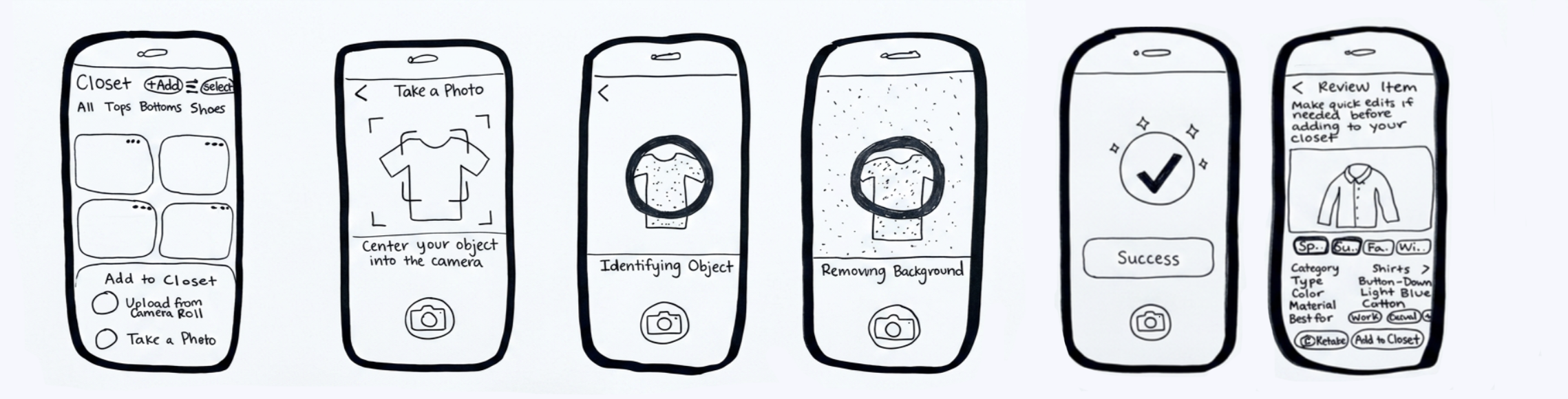
Figure 1. First flow: take a photo and add to your closet
Research and Exploration
Competitive Analysis
Stylebook offered deep wardrobe organization and outfit-based packing lists, but the manual effort was heavy and the large amount of content could feel overwhelming.
I evaluated Stylebook, Smart Closet, Whering, and Acloset to understand how existing products approached packing, wardrobe organization, and outfit creation.
Smart Closet has the most extensive filtering l encountered, but its buying and selling features pulled attention away from packing.
Acloset offered AI-generated recommendations based on inputs like weather and activity, but it was less clear how those recommendations accounted for packing constraints.
Whering made outfit generation fast and flexible, but its social features made the experience feel better suited for inspiration than trip planning.
What I found was that nothing truly combined all three uses I wanted for Pack Light. Packing apps stopped at checklists, with no memory of what you actually wore. Wardrobe organizers knew your closet but nothing about your trips, while styling apps focused more on inspiration than packing constraints.
Nothing sat at the intersection of wardrobe data, trip planning, and behavioral feedback. That gap became Pack Light's thesis.
Understanding the user
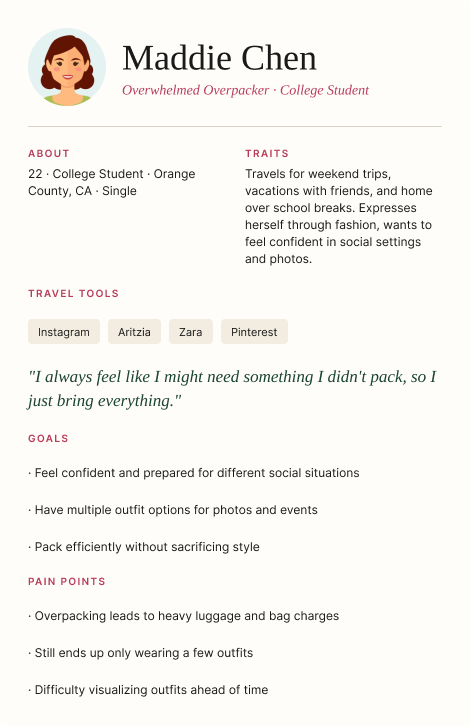
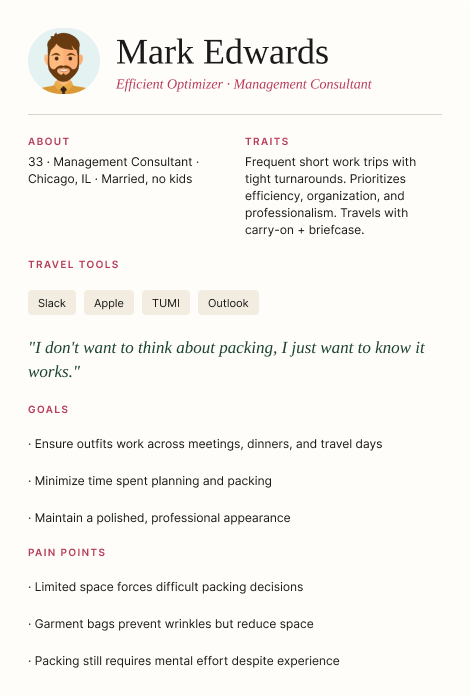
Pack Light's two primary personas sit on opposite ends of the travel spectrum: Maddie, a 22-year-old college student who overpacks for weekend trips with friends, and Mark, a 33-year-old management consultant who takes short business trips and just wants packing to work.
Working Personas
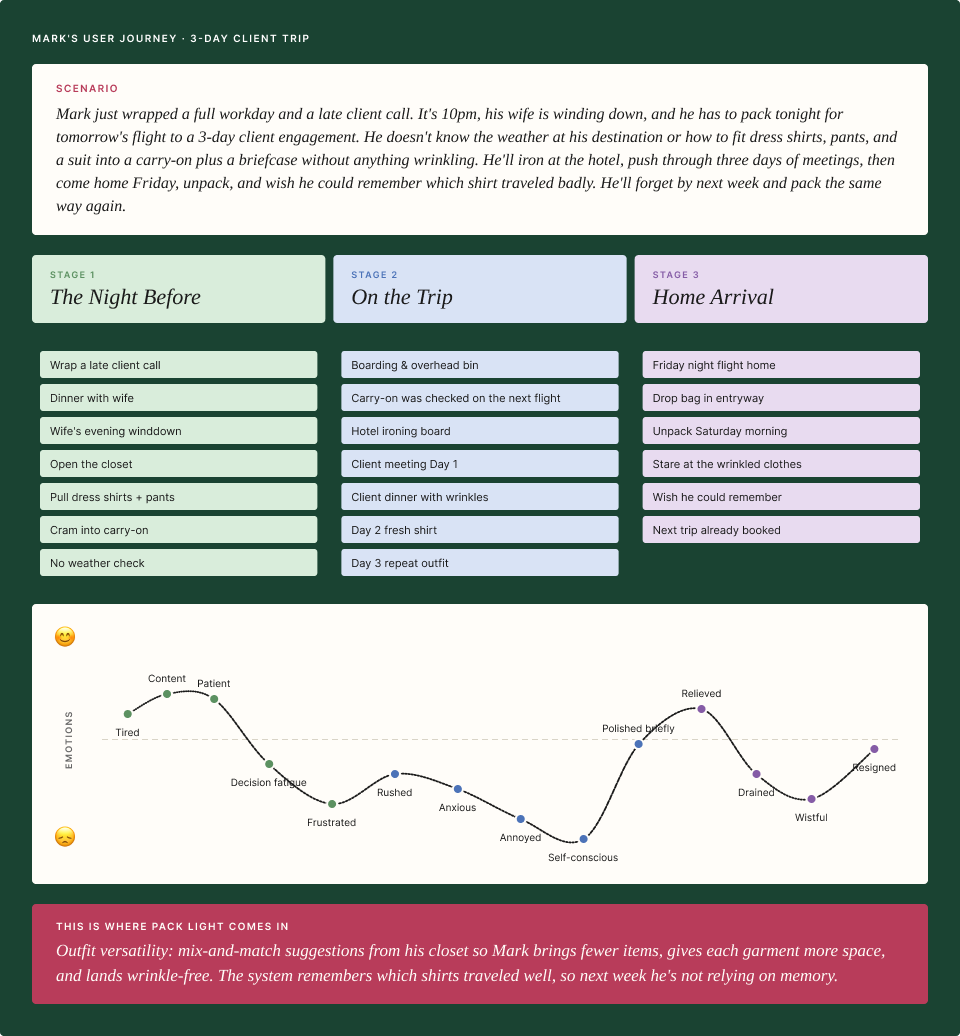
Mapping Mark’s Trip
These working personas helped me consider both style-driven and efficiency-driven packing behaviors.

DESIGN OPPORTUNITY
Build an app that learns each user’s packing personality through feedback on what they packed, wore, and left unused. It then recommends versatile items suited to each trip’s destination, weather, and planned activities.
EARLY DESIGN REQUIREMENTS

Defining the product
My Solution
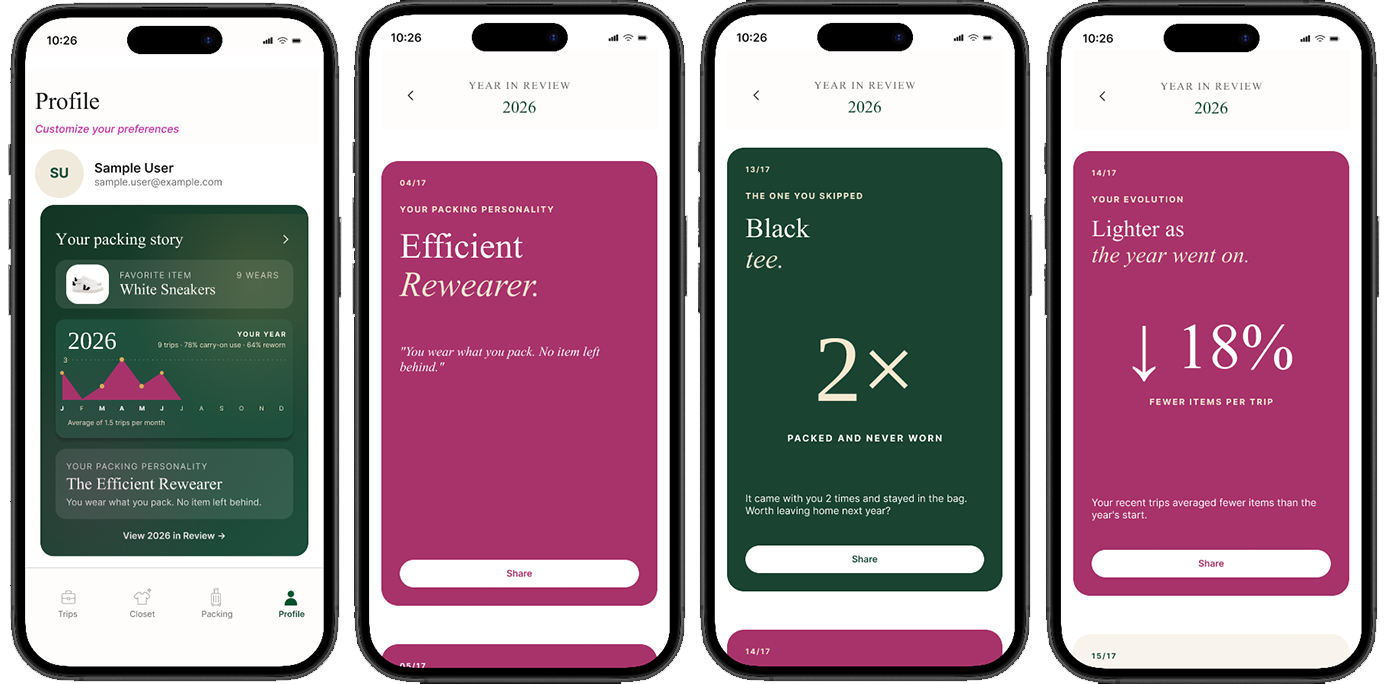
Pack Light turns my original photo workaround into a reusable system that connects trip planning, outfit combinations, packing lists, and post-trip feedback so users can remember what worked and make more informed choices. To make setup manageable, users can import trip details from their calendar, review automatically generated clothing tags, or explore with demo data. Profile tracks ongoing stats, including packing personality, while Year in Review highlights most-packed items, favorite basics, busiest travel month, whether users wore everything they packed, and more.
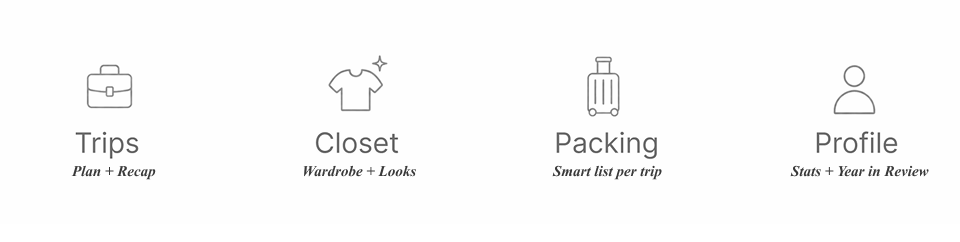
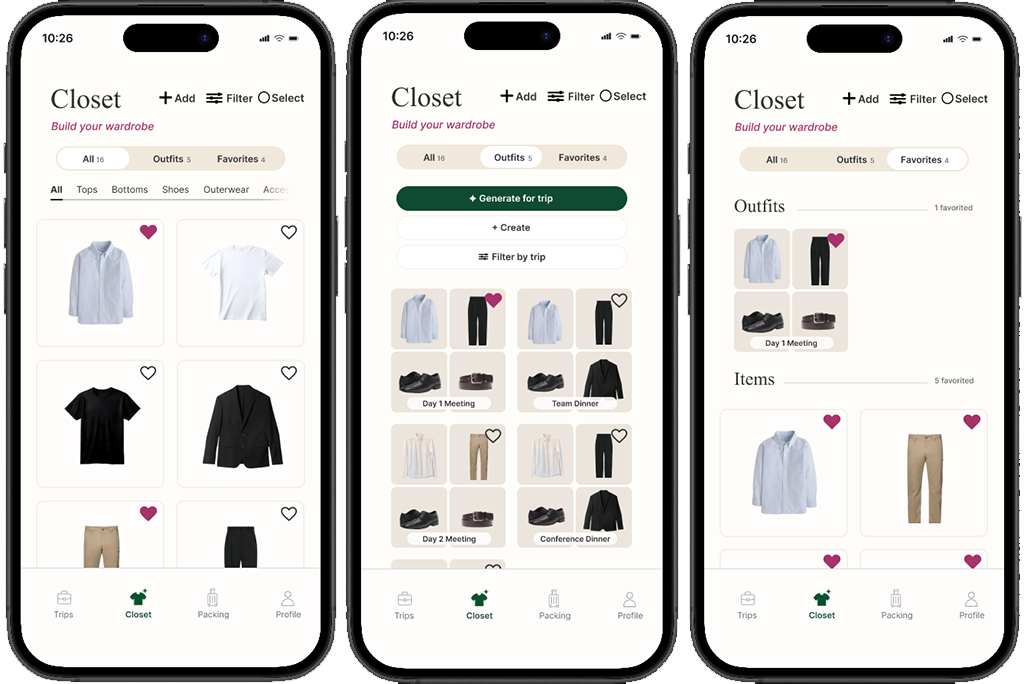
The final navigation includes four tabs: Trips, Closet, Packing, and Profile. Looks lives inside Closet, keeping outfit planning connected to the user’s wardrobe.
Designing ThE EXPERIENCE
Building Blocks
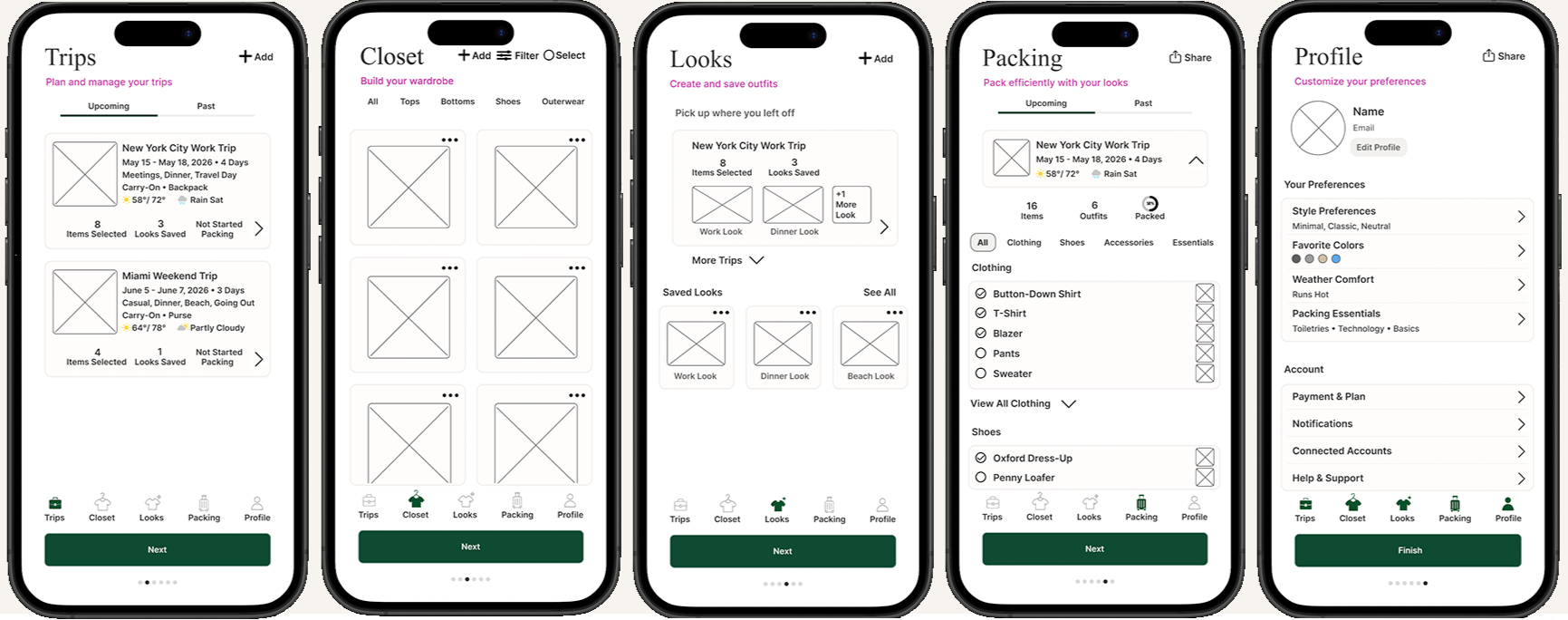
At first, I translated the concept into five core areas, reflecting my initial belief that each stage of the packing journey needed its own dedicated space: Trips, Closet, Looks, Packing, and Profile.

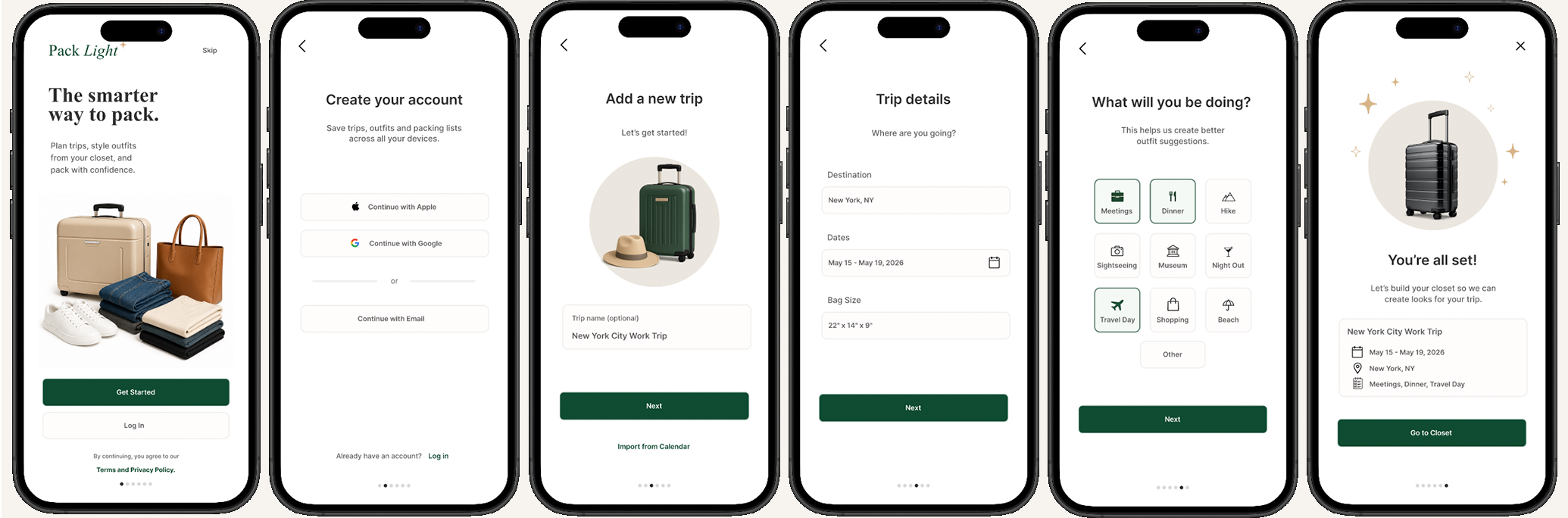
Early Onboarding
I drew an onboarding flow that had users create a trip from the get-go so they could start adding clothes right away. This assumed users would discover Pack Light when they already had a trip coming up. Early paper prototypes mapped how clothing moved into the closet, then into looks and packing lists.
Visual Direction
Color and Typography
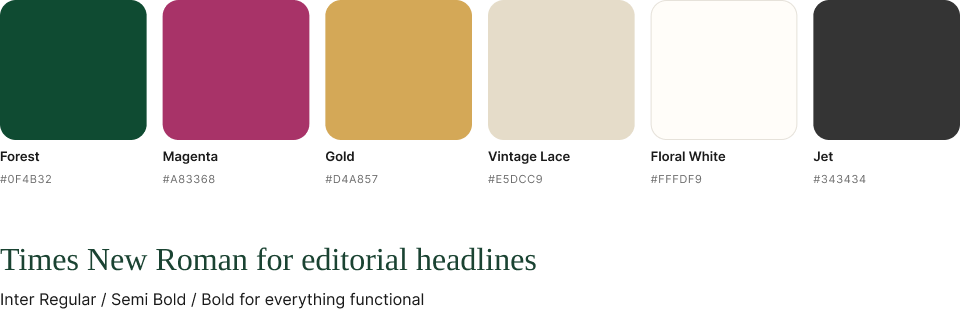
I intentionally moved away from the corporate blues common in productivity apps to give Pack Light a warmer, more distinctive, editorial identity.
Usability Testing
Feedback From Users

Five 20-minute sessions. Four testers in my target demographic plus one out-of-demo. Each completed the core flows and explored the main navigation pages in mid-to-high fidelity.
Iteration
This feedback was invaluable. Rather than patching individual screens, I used the feedback to rethink three parts of the experience: how users reach value, how the product is organized, and how it learns over time.
Testing revealed that it took too much effort before the payoff. I moved from a setup-heavy onboarding flow to progressive onboarding: users can start with a trip, photograph only a few favorites, personalize, or explore with demo data. The short tour is optional.
How users reach value
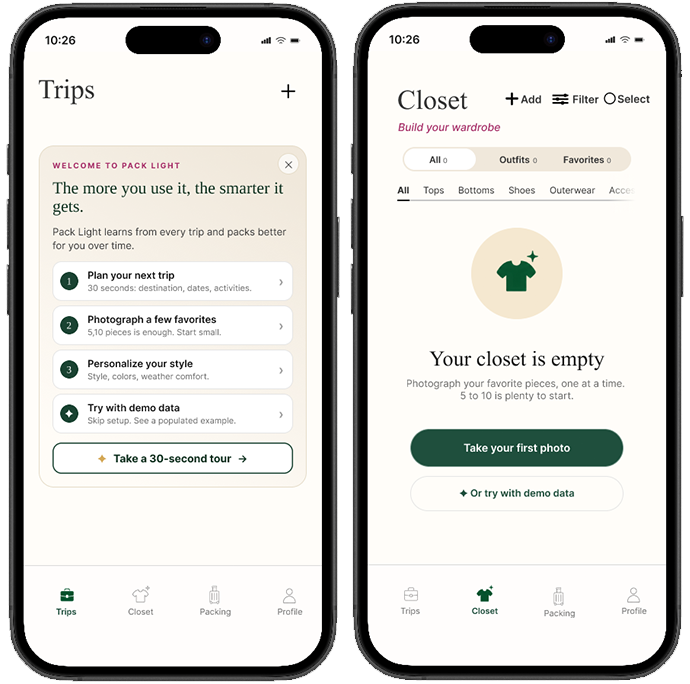
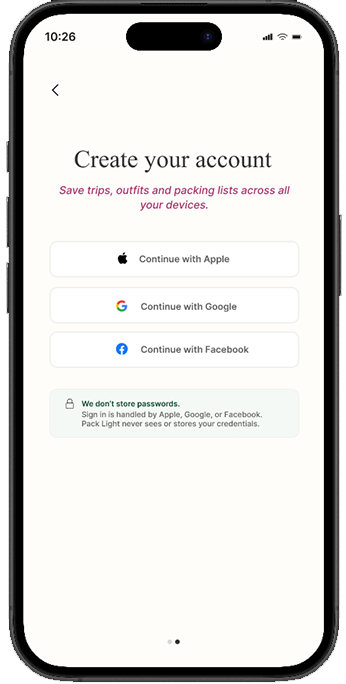
Feedback also raised a trust concern around account creation. Instead of asking users to create and store another account with an email and password, I shifted sign-in toward familiar third-party options.
Users expected Looks to live inside Closet, so I reduced the original five-tab structure to four and brought items, outfits, and favorites into one area.
How the product is organized
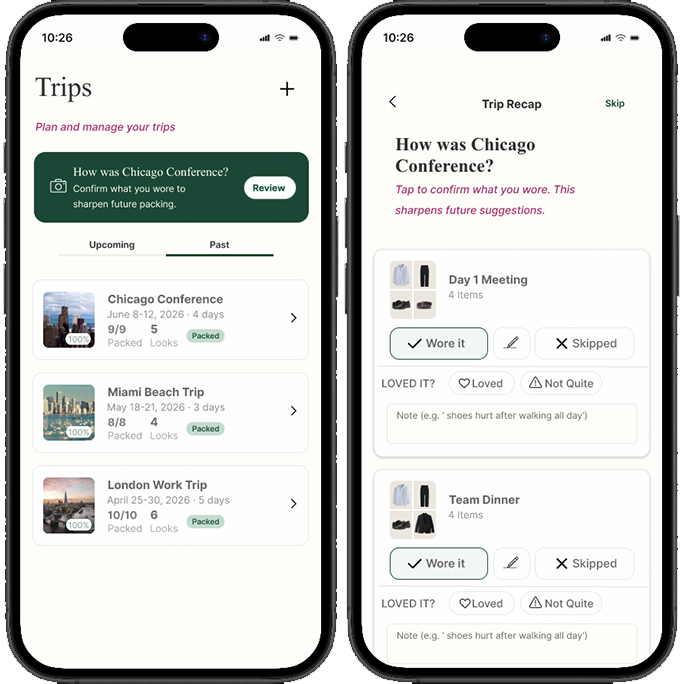
After each trip, users can confirm what they wore, skipped, loved, or would change. That history combines with trip context to make future packing recommendations more relevant.
How the product learns over time
Designing for user retention
Building Reasons to Return
As Pack Light evolved, I focused on what would make the product more valuable with every trip. Later work in desirability, persuasion, and data integration led to three additional requirements: calm, honest, and retention-first

Giving Back to the User
Figure 2. Your packing story and Year in Review visualized using demo data.
Full PROJECT Walkthrough