
A UX CASE STUDY • Solo academic project

An associate-facing retail inventory app that helps employees verify stock, locate products, and resolve inventory mismatches.
I first explored retail in Information and Content Strategy, where I studied Reformation’s hybrid shopping experience through the lens of how information is communicated across physical, digital, and human touchpoints. The project focused on whether those touchpoints worked together clearly enough for customers to navigate the experience in whatever way felt most natural to them. Inventory emerged as one of the places where this could break down.
I later returned to that problem in Data Science, Management, and Business Strategy, this time focusing specifically on the associate side of inventory verification. I looked at where mismatches occur, what information employees need, and how better inventory visibility could support both the customer experience and purchase completion. Together, those two perspectives shaped Inventory Simplified.

PROJECT SNAPSHOT
ROLE
Product Designer & UX Researcher
Two graduate projects exploring the same retail problem from customer and associate perspectives.
Context
TOOLS
Figma, Cue, Google Forms
In-person interviews, survey design and analysis, information strategy, data strategy and governance, business strategy, data visualization, visual storytelling, product concept development, UI design, and prototyping.
RESPONSIBILITIES
PROJECT TYPE
Solo academic project & product concept

PROJECT Introduction

Inventory mismatches create friction across both sides of the retail experience.
PROblem statement
How might we help retail associates verify product availability quickly and confidently during customer inquiries?
Design question
Providing retail associates with real-time inventory visibility will increase purchase completion rates by 15% during stock inquiries.
Hypothesis
Inventory distortion was projected to cost retailers $1.7 trillion globally in 2024.
WHy it matters

Understanding Where Inventory Breaks Down
Research
I started with 5 interviews and 39 survey responses at Reformation, then surveyed 19 retail associates to understand what happens when inventory information doesn’t match what’s actually in store.
Understanding the customer
Customers used both self-service and staff support.
48% used the in-room iPad, while 38% said staff assistance helped them know where to go or what to do.
Inventory was one place the experience didn’t line up.
“Sometimes there’s more on the screen than what’s on the floor.”
The digital tool itself worked well.
95% of iPad users rated its usability a 4 or 5.
Understanding the associate
Incorrect inventory data was common.
84% had encountered mismatches between the system and what was actually available in store.
84% had encountered items listed as in stock that they couldn’t find.
Manual verification was still part of the workflow.
63% still leave the sales floor to verify inventory.
Associates already start with the inventory system.
79% said they check an inventory system first when a customer asks about availability.
Associates wanted more useful inventory information.
Real-time quantity, in-store location, and restock dates were the most requested information.
Whether customers browsed independently or asked for help directly, inventory questions could still lead to manual verification. Even when associates started with the system, gaps in the data often meant double-checking availability themselves.
Design opportunity
Give associates reliable inventory information, show where the item should be, and provide a next step when the system is wrong. Encourage feedback.

Designing ThE EXPERIENCE
From Lookup to Resolution
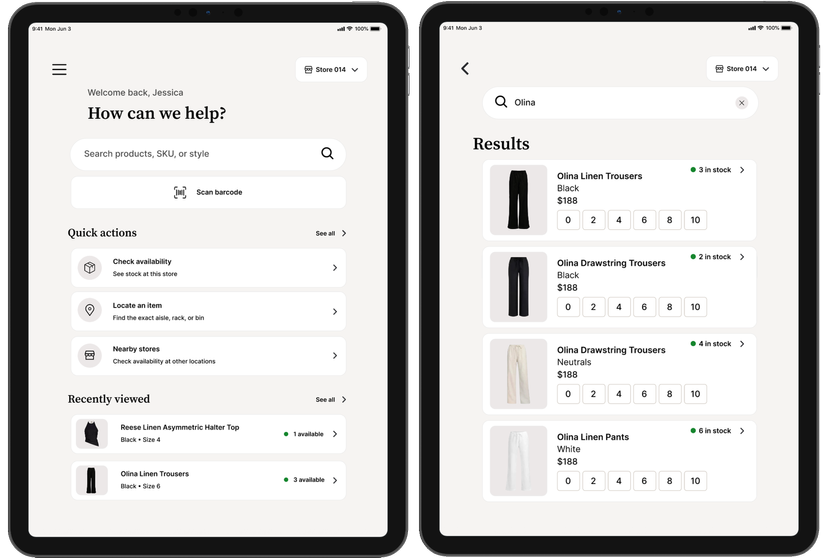
I designed the workflow around three things associates needed during a stock inquiry:
Verify
Check the right product and current availability.
Locate
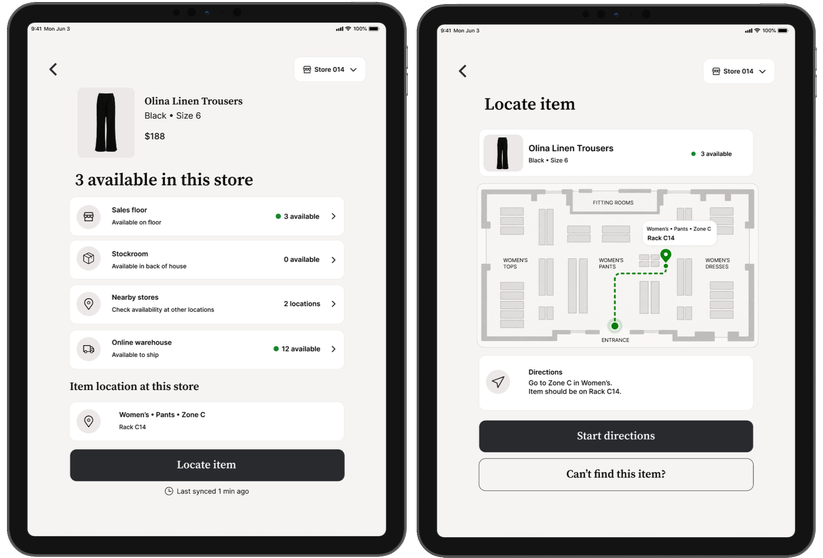
See where the item should be in-store.
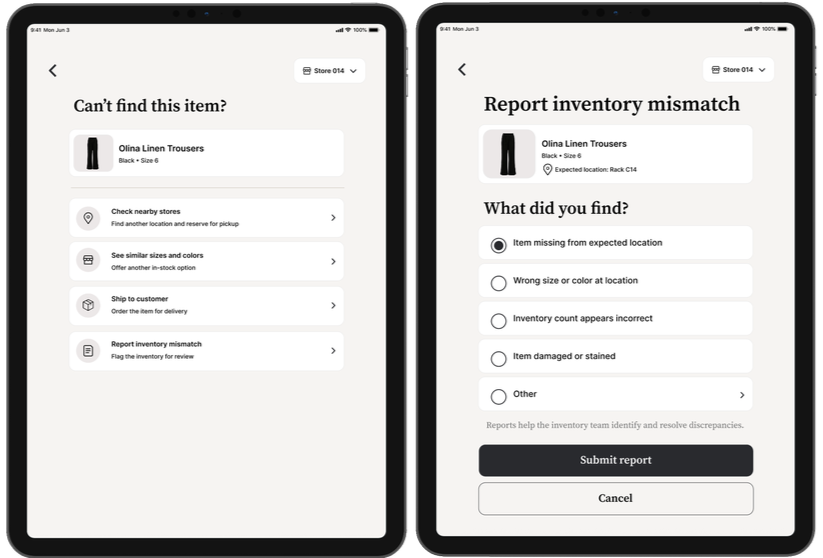
Resolve
Keep the interaction moving when it can’t be found.

Visual Direction
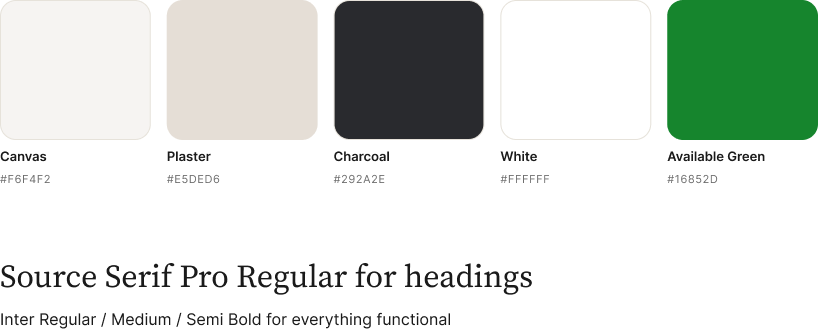
Color and Typography
I opted for a restrained neutral palette with green reserved for meaningful status information.

Designing for Trustworthy Inventory
Data governance
In the second project, I also explored the governance needed to keep inventory information accurate and appropriately accessible across the system.
Access
Role-based permissions so customers, associates, and managers only see what they need.
Accuracy
Clear data ownership, verified updates, and regular accuracy reviews to reduce mismatches.
Accountability
Audit trails and stewardship practices to make inventory changes traceable.

Full PROJECT Walkthrough

Extend Beyond the Associate Workflow
next steps
The prototype focuses on associates. Next, I would define how customer-facing inventory could stay in sync with associate tools while still showing each audience only the information they need.
The original 15% increase in assisted purchase completion remains a hypothesis and would need to be tested with the prototype.